Building a Warehousing App
On Monday 5 October we spent an afternoon building a warehouse app for a company we only knew from a Reddit post.
Three people. They sell OEM car parts, about 2,000 of them, out of one warehouse with one person working in it. The stock lived in a spreadsheet, and they asked what to use instead. What made the post worth an afternoon was that they had written down what they needed: scanning with the barcodes the manufacturers already print on the boxes, bin locations, safety stock, a view of what was already on order, and a way to check a delivery against the purchase order it belonged to. And above all of that, it had to be simple enough for the one person in the warehouse.
We liked that last line more than the rest of the list put together. Most inventory software is built for the person who signs the contract, and the person who has to count 40 brake discs on a Tuesday morning gets whatever screen was left over.
So we built it, put it in the App Library with sample data, and published the source in our examples repository. This is how it went, including what it found wrong with our own platform.
It started with questions
A coding agent wrote the app, working in a folder, with the cordango command line doing the checking. No canvas, no drag and drop. The folder has an instruction file the agent reads before anything else, and its first heading is "Start with questions, not with an entity".
That rule matters most when the brief looks complete. A list like theirs practically begs you to start typing out tables. The questions that decided the app were about the work instead. Who may change what a part costs? Who may correct the stock by hand? What happens when 38 brake discs arrive and 40 were ordered? Does the order stay open for the other two?
That last one was ours to decide, and we decided the order stays open. Rest comes later books what arrived and keeps the shortfall on order. Complete with discrepancies closes the order where it stands. Either way the quantity on the purchase order is never edited to match what turned up.
Then the loop:
cordango check --app warehouse
cordango check --app warehouse --target platform
The first says whether the definition is valid. The second says whether the platform can run it. The agent ran them after each change, read the complaint, fixed the line it named and ran them again.
What came out is a folder of about 3,800 lines of YAML: nine entities, eight screens, three roles, two order lifecycles, 24 commands and seven automations. (We counted the lines afterwards, because somebody always asks.) That sounds like a lot. It is also, line for line, only about a warehouse.
Suppliers and customers are not in that folder. They are the companies already in the workspace's Organizations, the same records a CRM would use. Every person is a platform user. Sign-in, roles, change history, notifications and the scheduler that runs the morning stock check all belong to the platform. The app only had to describe the warehouse.
Stock is a ledger, never a typed number
This is the decision the whole app hangs off, and the one we would defend hardest.
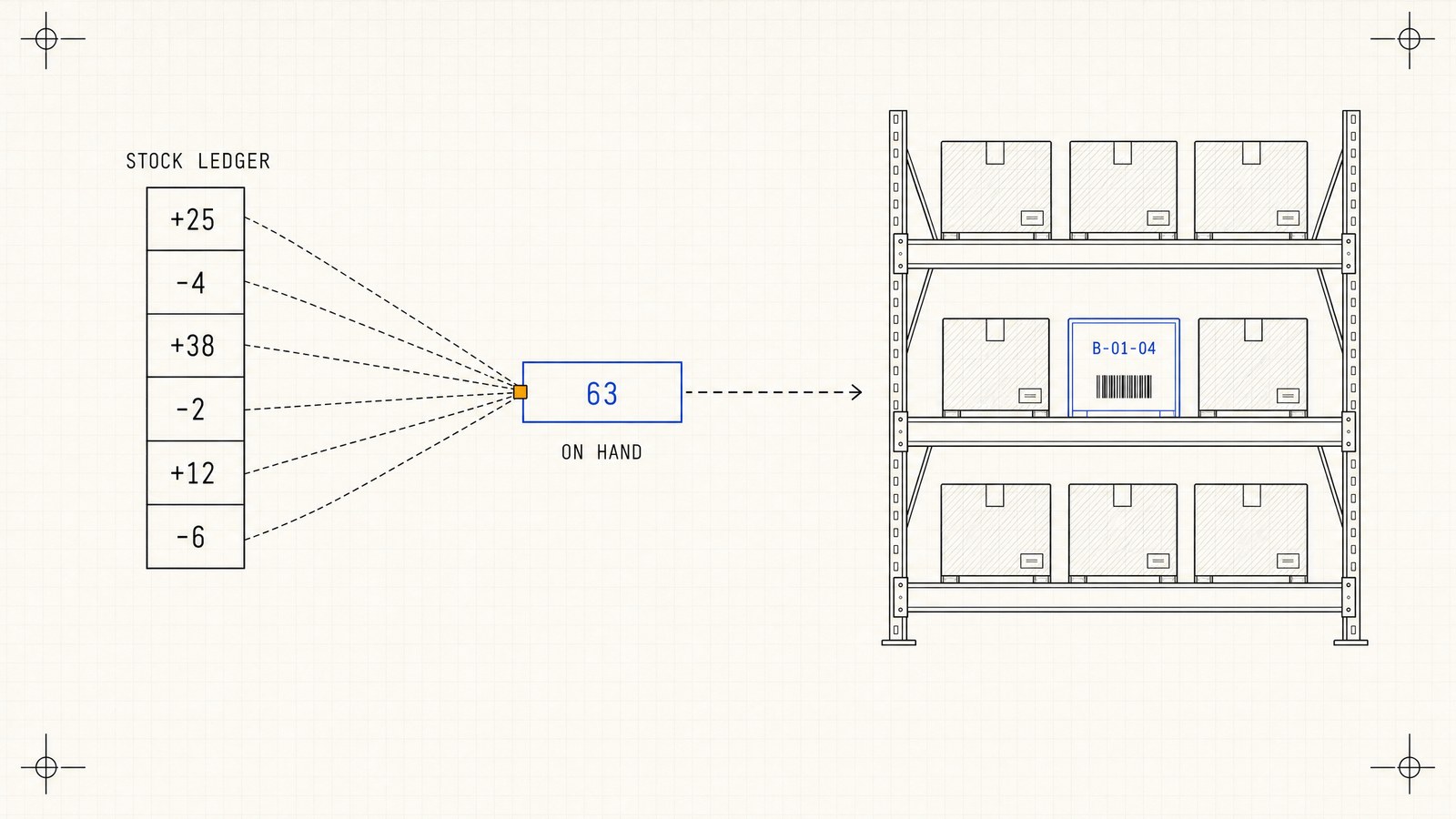
Nobody types the number on hand. Every receipt, shipment, count, return and move between bins is a stock movement, and a part's stock on hand is the sum of its movements. A movement is never edited. A mistake gets put right with another movement, so the history always explains the number and says who did each thing.
In the definition it looks like this:
on_hand:
  computed:
    rollup:
      entity: stock_movement
      via: item
      op: sum
      field: quantity
Reserved and on order work the same way, read straight off the open orders. A customer order holds stock from the moment it is released until it ships or is cancelled. A purchase order counts as on order until it is closed. Everything else is arithmetic anybody can check. Available is on hand minus reserved, and the recommended reorder is max(0, safety_stock - available - on_order), rounded up to the part's usual order quantity.
This is also where we said no to the brief we worked from. It listed Reservation and ReservationRelease as movement types, which is a reasonable thing to write down and a bad thing to build. A reservation row disagrees with its order the first time somebody edits a line, and every way out of a reservation needs its own release row. Work it out from the order's state and it cannot drift.
We left out the column every stock spreadsheet has, too. The running balance looks harmless until somebody books a movement with yesterday's date and every later row needs recalculating, and two movements booked in the same second have no defined order at all. A stock count still records both numbers, what the system said and what was on the shelf ("12, counted 11"), because those are facts about that moment.
A stock number that somebody can type into will be wrong by Friday. We are fairly sure of that one.
Three minutes on the sample data
The library version installs with about 50 parts, 20 bins, five suppliers, five customers, purchase orders in every state and two months of stock history. Three things are worth trying on it. The scan box takes a USB or Bluetooth scanner, and if you have none, typing the code and pressing Enter does the same.
A delivery that is not what was ordered
Open Receive and pick PO-2026-1042 from Nordteile. It expects 25 oil filters, 40 brake discs and 10 air filters. Scan the oil filter and press All arrived. Scan the brake disc, press Count and enter 38. Scan the air filter, press Count again and enter 12.
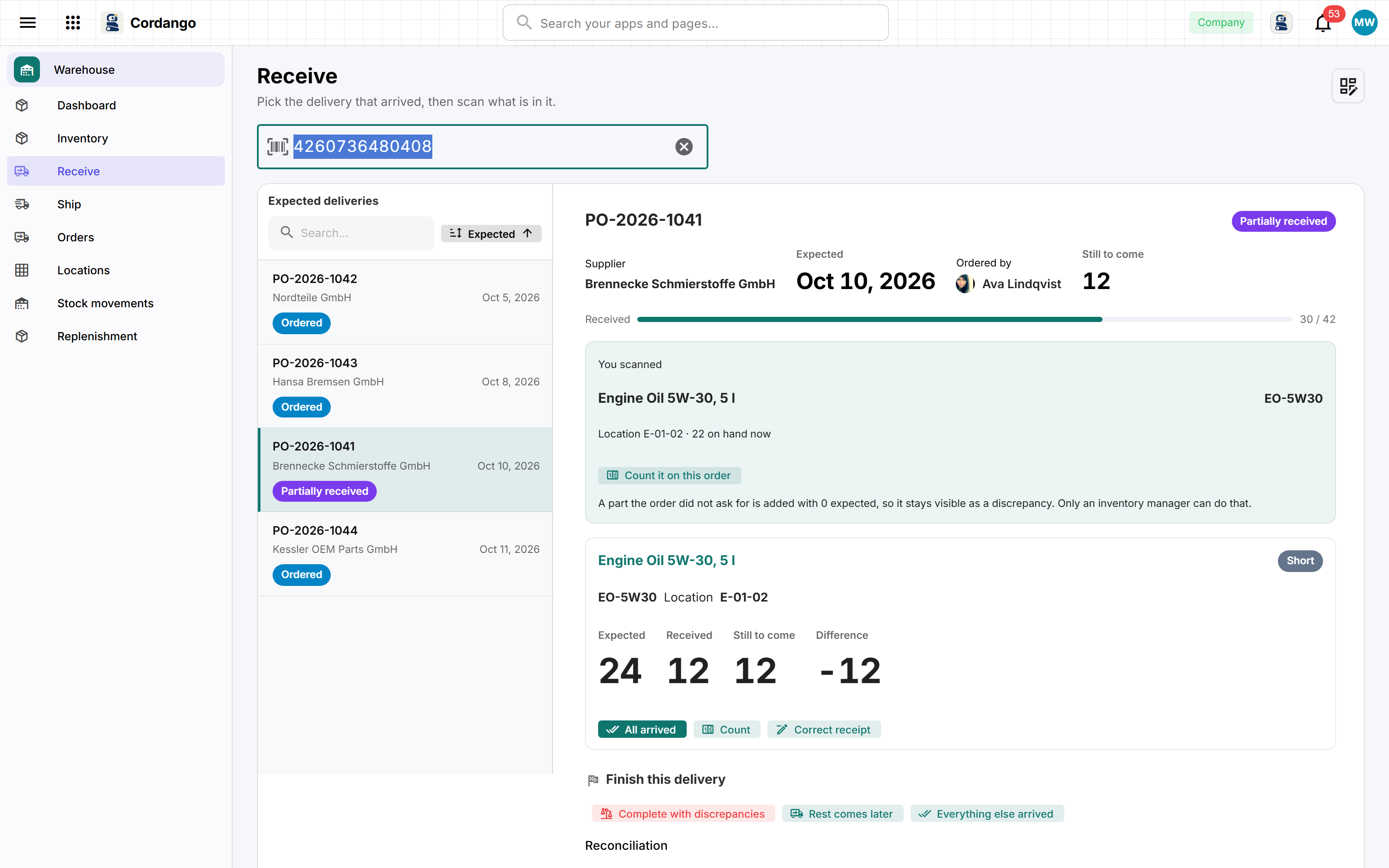
The lines now read Complete, Short -2 and Over +2.
Seventy-five were expected and seventy-five arrived. A spreadsheet would compare the totals, find they agree, and everybody would go home happy with two lines still wrong. That is why the comparison is per line. Complete with discrepancies closes the order, the shortage and the overage stay on the record, and whoever placed the order is told.
Picking an order
Open Ship, pick SO-2026-0834 for ACME Auto and press Start picking. The screen shows one part at a time, in the order you walk the warehouse, with the bin and the quantity in large type. Oil filter, 4, B-01-04. Press Picked and it moves on to the brake disc, 2, A-03-02.
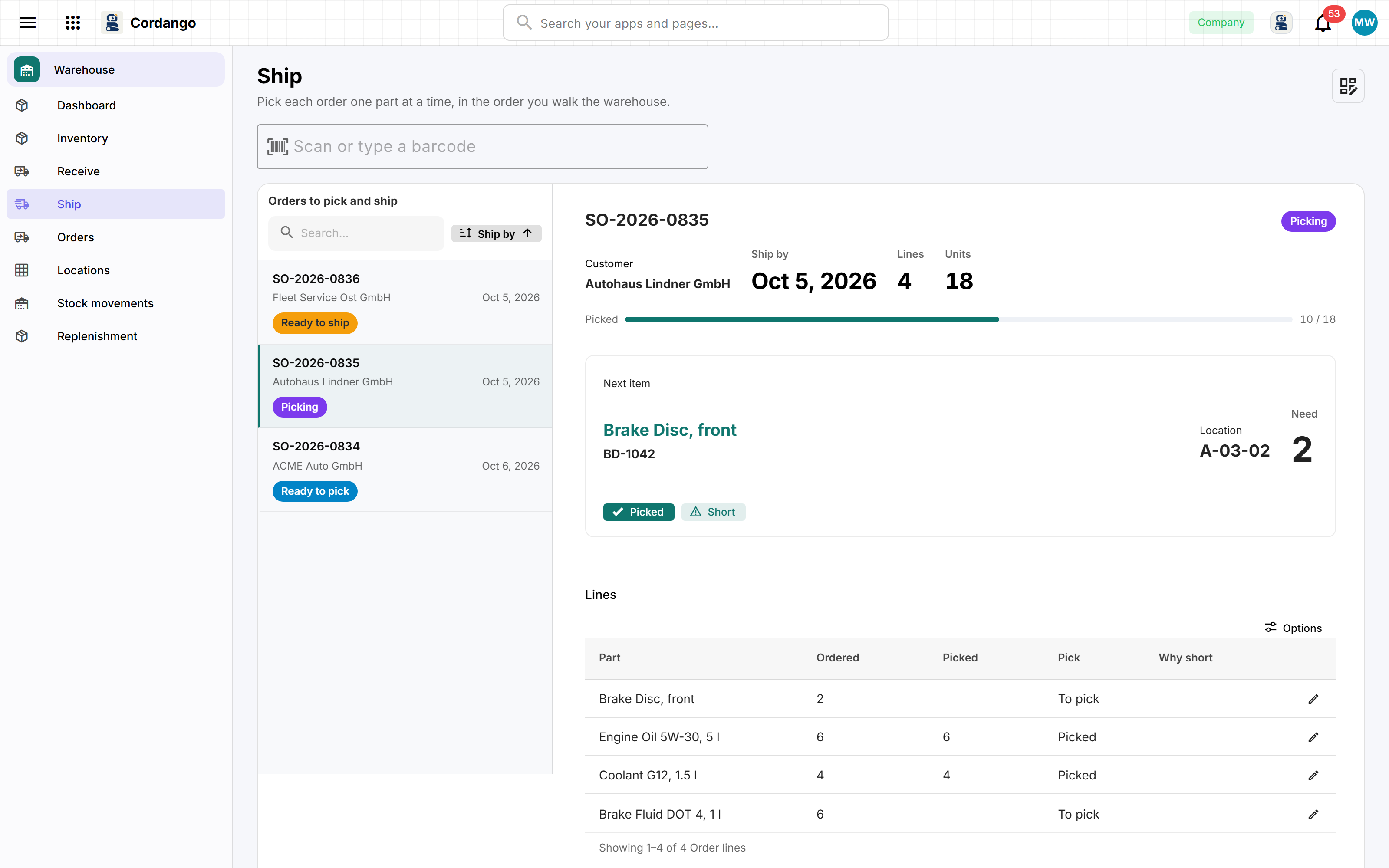
This is the screen the "simple enough for one person" line was really about. When the last line is done the order reads Picking complete, 18 of 18, and Ship takes the stock off the books.
Reordering
Open Replenishment. The brake pad set BP-5512 has 7 available against a safety stock of 20 and nothing on order, so the app suggests 13. Open the draft PO-2026-1045 for Rheinland Autoteile and press Add what this supplier needs, and every Rheinland part on the reorder list lands on the order at its suggested quantity.
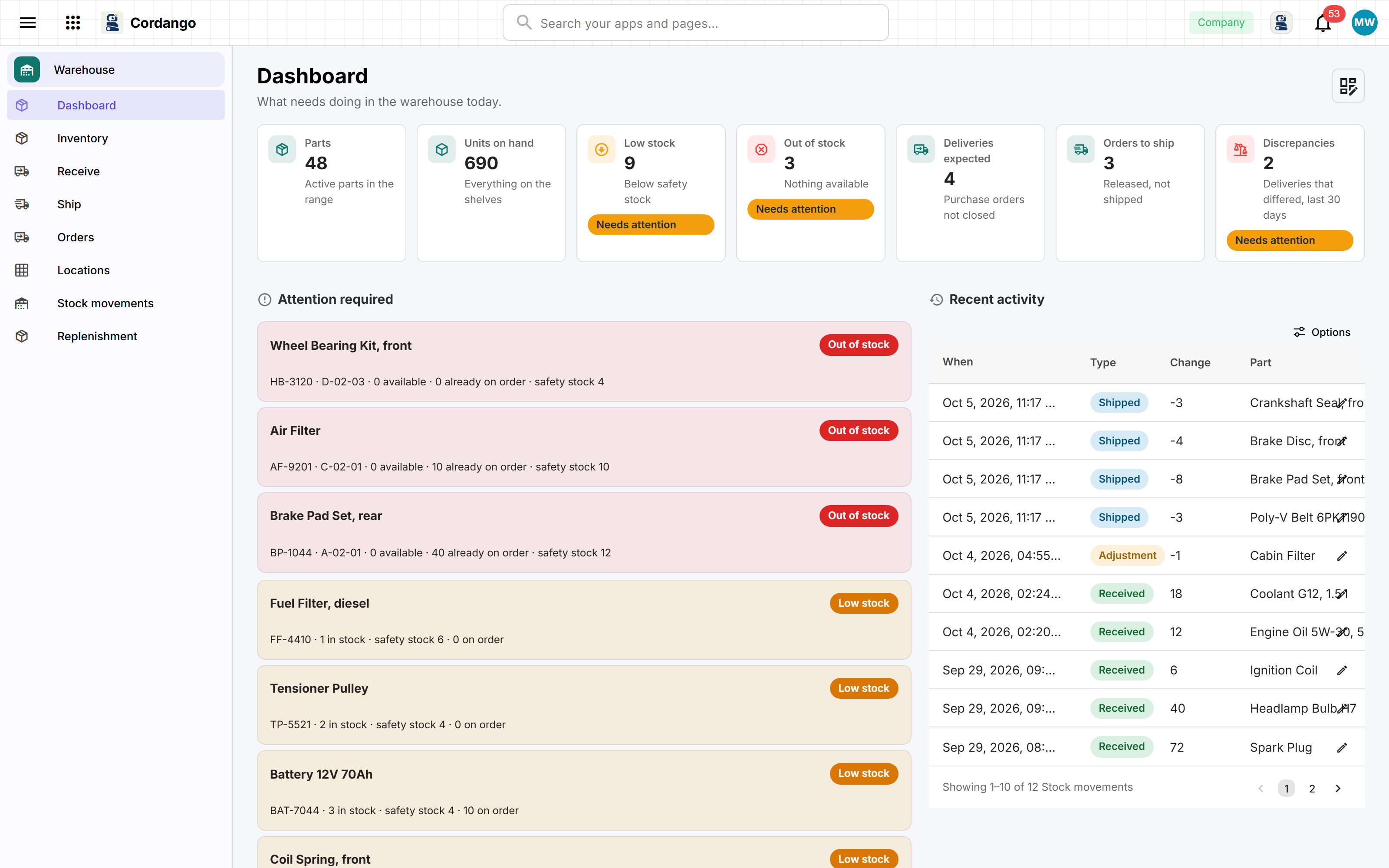
The buyer hears about it without opening anything. A check runs every weekday morning and sends one alert per shortage, then stays quiet until the part no longer needs reordering. One alert, not one a day for three weeks.
What the warehouse found in our platform
We expected the app to be the work. It wasn't, and most of the surprises that Monday were on our side. We fixed them in the platform rather than bending the app around them.
On order and reserved were zero for every part. The YAML was right. Our platform read every value one reference away as a number, because it could not see what kind of field sat on the other end, so an expression like if(order.is_open, outstanding, 0) passed every check and then came out blank. Rewriting the warehouse to avoid it would have been quicker, and it would have left the bug waiting for the next app. The platform now reads the real kind of the field it points at.
The second part without a barcode was refused. Barcodes are unique, because two parts must never share one. Plenty of parts have no barcode at all, though, and to a unique index an empty text is a value like any other, so the second part without one was a duplicate of the first. An empty unique field is now stored as no value at all.
There was no box a scanner could type into. A USB scanner pretends to be a keyboard. It types the code and presses Enter. Our ordinary search box searched on every keystroke, which for a 13-digit barcode meant reloading the list thirteen times. The scan box acts on Enter and nothing else, clears itself after each scan and takes the focus back, so the next scan lands in the right place.
There was no way in from a spreadsheet. For an app whose whole reason to exist is a spreadsheet, that was a bit embarrassing.
Import got built the same day. It sits next to New part: map the columns, check every row, import the ones that are ready. Every row goes through the same path as the form, under the importing person's role, so a warehouse worker cannot import parts because a warehouse worker cannot add them. A cell that could mean two things is refused with a sentence that says how to write it. 1,234 is over a thousand in an English spreadsheet and just over one in a German one. 03/04/2026 could be March or April. The sample spreadsheet stops on three rows on purpose: a bin called B14 that does not exist, an OF-2210 that is already a part, and a SKU used twice.
On Sunday it built as an app you own
The warehouse was meant to be a platform example, and we said so when we built it. The point was how little warehouse software it took when the platform does the rest.
On Sunday 11 October we pointed the standalone generator at it anyway, and it refused to build. The open source compiler did not yet know several things the platform did: names on split screens, filters that reach through a reference like item.barcode, totals under order lines. We closed those in the open source toolchain.
Now cordango build turns the same folder into an ordinary ASP.NET Core, EF Core and PostgreSQL application with a Vue 3 front end. docker compose up --build starts it, and the first screen asks you to create the administrator. It comes with its own people and organizations, an API you can read and call in the browser, and an MCP endpoint, all behind the same roles.
We gave one thing up to get there. The detail screens used to have a Changes section showing who edited which field. Change history is part of the platform and does not exist in the standalone runtime, so the section went, on both. The part's stock history still lists every movement, which for a warehouse is the history people actually look at. We think that was the right trade. We are not completely sure.
Where it is now
The company that asked is trying it. We are not going to report how that goes until there is something to report, and a warehouse needs a few weeks of real deliveries before anything it says means much.
If your stock lives in a spreadsheet as well, the Warehouse app installs from the App Library with the sample data above, and the three steps take about three minutes. Then import your own parts list and look at which rows it refuses. That list is usually more interesting than the stock. Not on Cordango yet? Get early access. And if you would rather read YAML than click, the source is on GitHub.
BP-5512 is still at 7 in the sample data. Somebody should order those brake pads.
See Cordango in your own company
The fastest way to understand it is to watch it stand up a company and add an app live.
Sign up →Read more about Cordango
- Warehouse The stock list has outgrown its spreadsheet. Scan what arrives against what was ordered, see what is running low before it runs out, and pick customer orders bin by bin.
- App Library Ready-made business apps that already know how to work together
- Ownership & portability A definition you own, built into software you own
Related posts
We Gave ChatGPT a Command Line and It Built a Real Time Tracking App
ChatGPT cannot install our command line by itself. Hand it the Linux package and it can. It wrote a German working time app, argued with the compiler until the app passed, and published it to the platform while we watched.
Read →What We Open Sourced, and What We Did Not
On 20 August the compiler and the command line tool left our private repository under Apache-2.0. Here is what you can do with them, what you cannot, and why the line sits where it does.
Read →