ORGANIZATIONS

Know who you are
actually dealing with.

Every company you deal with, once. Prospect, customer, vendor, partner, investor or a company you hold a stake in, and often several at the same time. Cordango researches each one for you and files what it finds with how much to trust it, so the list stops being a list of names.

CUSTOMER VENDOR PARTNER INVESTOR ONE COMPANY RECORD Globex SE ONE OWNER ONE HISTORY FIG.00 — 6 RELATIONSHIPS · 1 RECORD
FIG.01

The company you deal with is not four companies.

— the problem

Business software splits a company up. The CRM has a version, invoicing has a version, the project tool has a third, and somebody keeps the real list in a spreadsheet. Ask which address is right and you get an argument rather than an answer.

That example is not invented. Two records for the same customer in our own demo company had already drifted to two different streets before anybody noticed, and nobody had done anything wrong. That is what two copies do on their own.

  • ONE One record per company, whatever role it plays for you
  • ROLES Customer, vendor, partner and investor at the same time
  • TREE Groups, subsidiaries, branches and sites as real relationships
  • OWN A named internal owner, not whoever created the row
Master data · discoveredQ3 review
# the same company, four systems > Globex SE ? in the CRM → Globex SE · owner Tomas ? in invoicing → Globex S.E. · Speicherstadt 14 ? in the project tool → Globex · no address at all ? in the supplier sheet → GLOBEX SE · Am Sandtorkai 42 ✗ one company four records · four owners · no answer
FIG.02

What a company record already is.

This is not an empty table with a name column waiting for you to design it. Organizations arrives knowing what a company is, because that part does not differ between businesses.

IDENTITY

Legal identity

Legal name and legal form, register court and number, VAT id, incorporation date. The things that settle which entity you are actually contracting with.

WHERE

Two addresses, not one

The registered address and the head office are different questions and Cordango keeps them apart, with the country from a real list rather than free text.

ROLES

What they are to you

Prospect, customer, vendor, partner, investor, portfolio company. Several at once, and none of them expires. Where a company sits in a sales process is the CRM’s business and lives on the deal.

GROUP

Groups and subsidiaries

Holding, operating company, subsidiary or branch, and the companies underneath this one. Deleting a holding never deletes what sits under it.

PEOPLE

The contacts inside it

The people you actually deal with at that company, kept separate from your own staff directory, because they are not the same thing.

OWNER

Somebody responsible

A named person in your company who looks after this relationship, from the same people records every other app uses.

TERMS

How you bill them

Billing address and payment terms, so the invoicing app does not need its own opinion about either.

MARKET

How big, how old, how funded

Headcount, founded year, funding stage and, for a listed company, its ticker and ISIN. Filled in by research rather than by you.

Sixty-nine fields on the company record, and three quarters of them are ones you never have to type.

FIG.03

Adding a company starts with a question.

— not a form

Somebody types TENTE. That could be the holding company, the operating company that actually makes the castors, or one of a dozen national subsidiaries, and which one it is decides who gets invoiced. So Cordango lists them and lets you point at the right one.

The answer comes back as a tree, because a flat list would lie. Search Porsche and a flat list puts Volkswagen AG and Porsche Automobil Holding SE side by side as if they were two readings of the same name. They are not. One owns the company you searched for and the other owns that, and the shape is what tells you who you are actually dealing with.

A name is never treated as an identity. It is an ambiguous input, which is what it is, and your click is what settles it. What that click supplies is the thing the whole research ladder needs: a domain.

Look at the chips. Four of these are already in this workspace, so the dialog says so and Add all offers the ten that are not. A group is usually added a piece at a time, and without that check the second pass would offer to duplicate the half that landed first.

  • TREE Ownership reconstructed from the lookup, drawn as a group
  • ALL Add the whole branch at once, parents written before children
  • KNOWS Companies you already have are marked, never offered twice
  • SAFE One subsidiary that will not validate does not lose the ten after it
  • OPT “Enter it myself” is always there, because a lookup will not know every small company
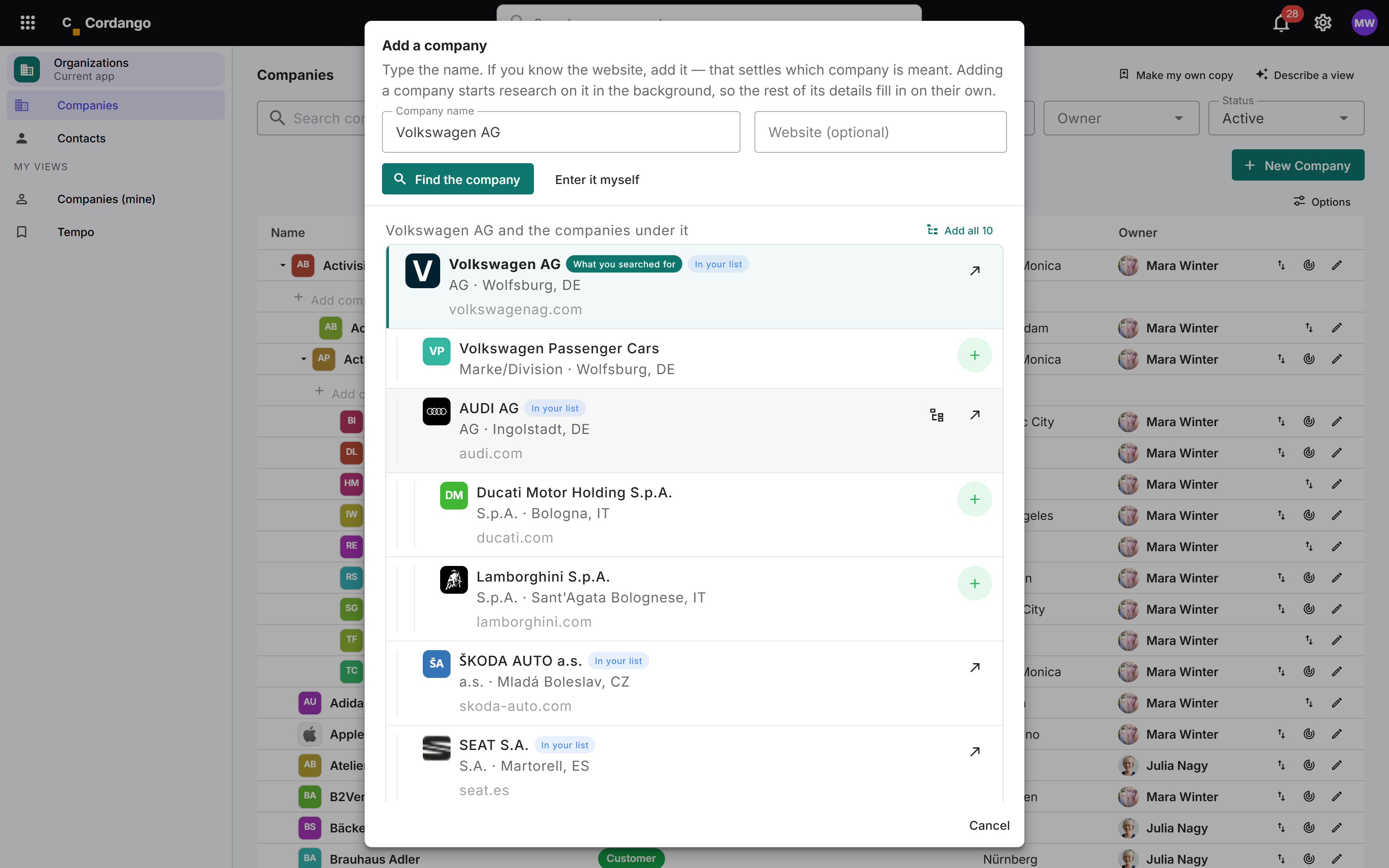
FIG.04

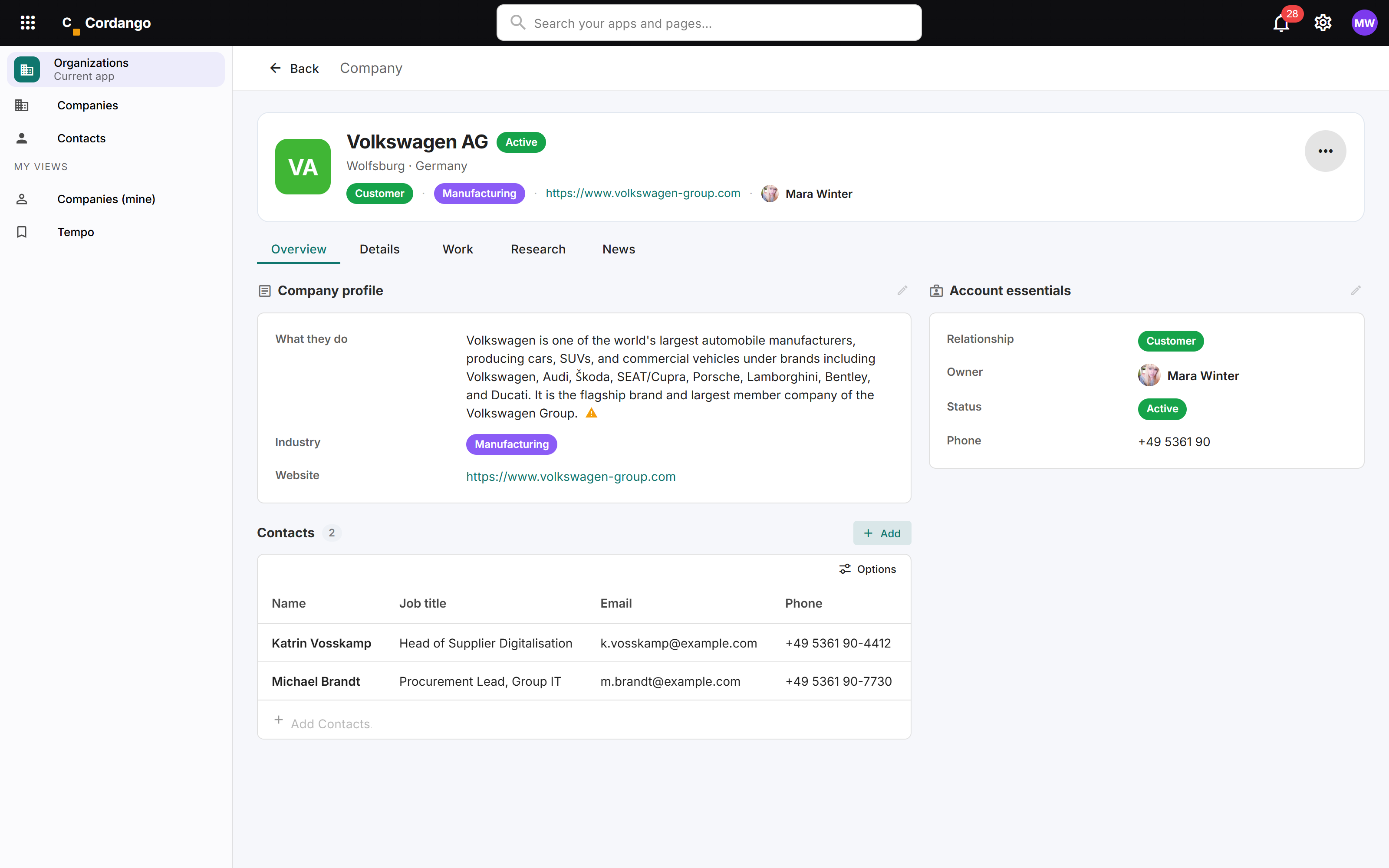
That is the actual screen.

— not a mock-up

One company, one owner, and the tabs that separate what you know from what was found. Everything on this page other than the relationship and the owner arrived without anybody typing it.

We are using a company you can check on purpose. A fictional customer proves nothing about research, because nothing about it is verifiable. If a value on this page is wrong, you can tell.

  • YOURS Relationship, owner and terms are yours to set
  • FOUND Everything marked found came from a research run
  • ASKS The mark beside the description is a value waiting for you to confirm it
  • SPLIT Research lives on its own tab and never overwrites the profile
FIG.05

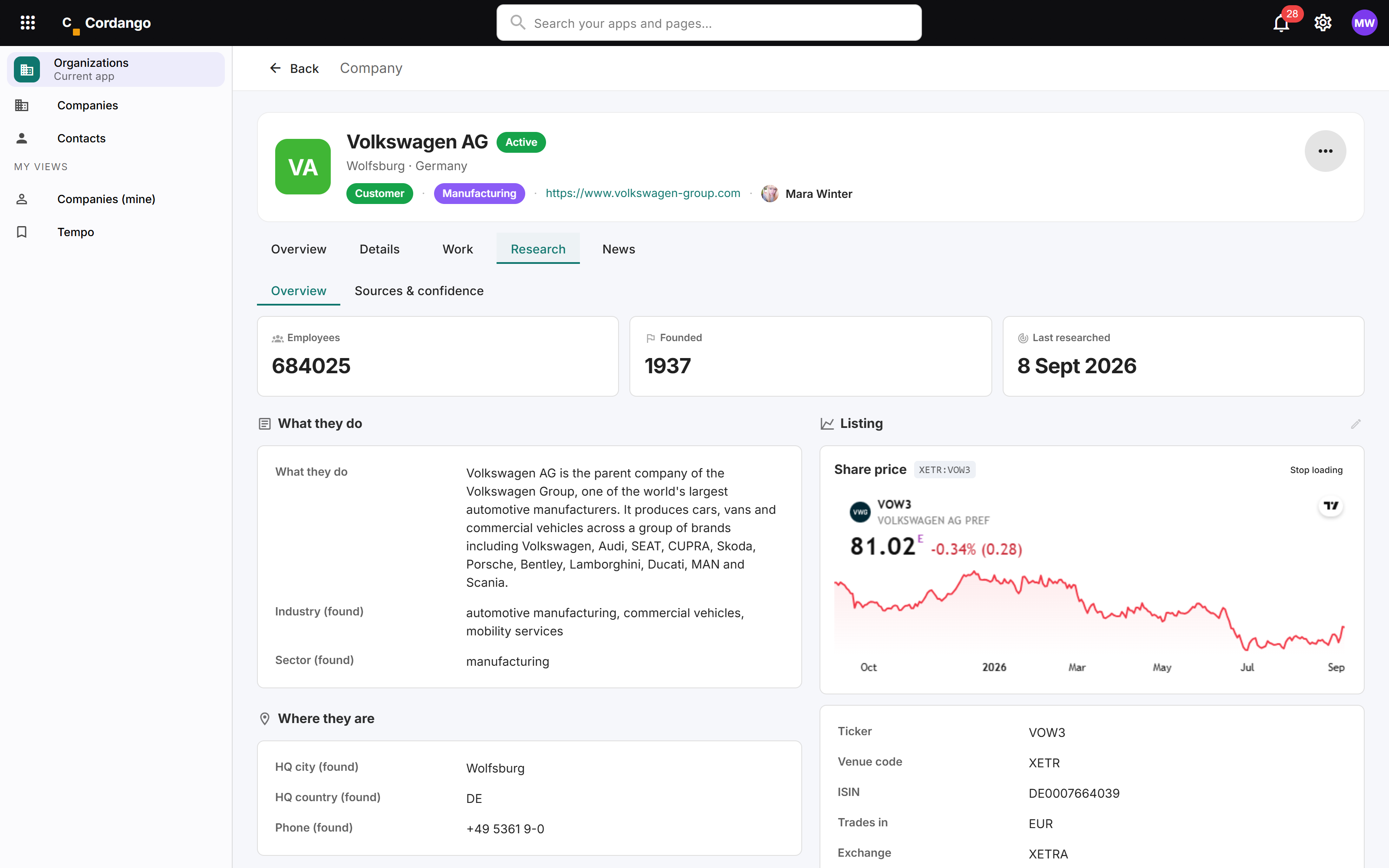
What comes back.

— the research

Enough to segment a list, spot a company worth calling, and walk into the call knowing who you are talking to. What they do, where they are, how big they are, how they are funded and who runs them.

For a listed company there is a share price panel too. It is a third-party embed rather than data we hold, so it is off until an admin in your workspace turns it on, and then it still loads nothing until the person looking at the record clicks. Two decisions by two people, which is the difference between compliance and a checkbox that looks like it.

A venue we have no mapping for gets no panel at all. The failure of a missing chart is visible. The failure of a guessed one is a chart for a different company.

  • REGISTER Legal name and form, register court and number, VAT id
  • MARKET Stage, ticker, exchange, ISIN and trading currency
  • MONEY Funding rounds, investors and total raised
  • PEOPLE Officers by name, and the parent company by name
FIG.06

How a fact earns its place on the record.

The useful question about researched data is not whether it is there. It is whether you can tell how much to trust it. Every value on the record answers that itself.

1

You point at the right company

The click in FIG.03 settles which company this is and hands over a domain. There is no name matching after this point and no confidence score about identity, because there is nothing left to be unsure about.

2

It reads their own pages

The imprint, about, careers and press pages on that domain. This is what proves the profile is about the right company: nothing is recorded until the company’s own legal or brand name turns up in its own site text.

3

One structured pass fills the register

A company’s own website does not state its register number, its VAT id or what it raised in any form worth quoting, so those come from a model rather than from a document. We say so on the record rather than dressing it up as a citation.

4

Every value is shape-checked

Placeholder detection, German register formats, VAT length by country, ISO country and currency codes, and the ISIN check digit. This proves a value is built like the thing it claims to be. It does not prove it is true, and the two are not the same.

5

It says how sure it is

Read off a page and verified, recalled by a model whose subject the site confirms, or unconfirmed. The level sits on the value. A candidate that failed a check is demoted rather than dropped, so you can see what lost and why.

6

Your answer wins

An empty field gets filled. A field you answered is never overwritten, by this run or any future one. A disagreement is recorded beside your value for you to look at.

A value it cannot re-establish is left alone rather than blanked. Unknown means this run did not find it, never that your answer was wrong.

FIG.07

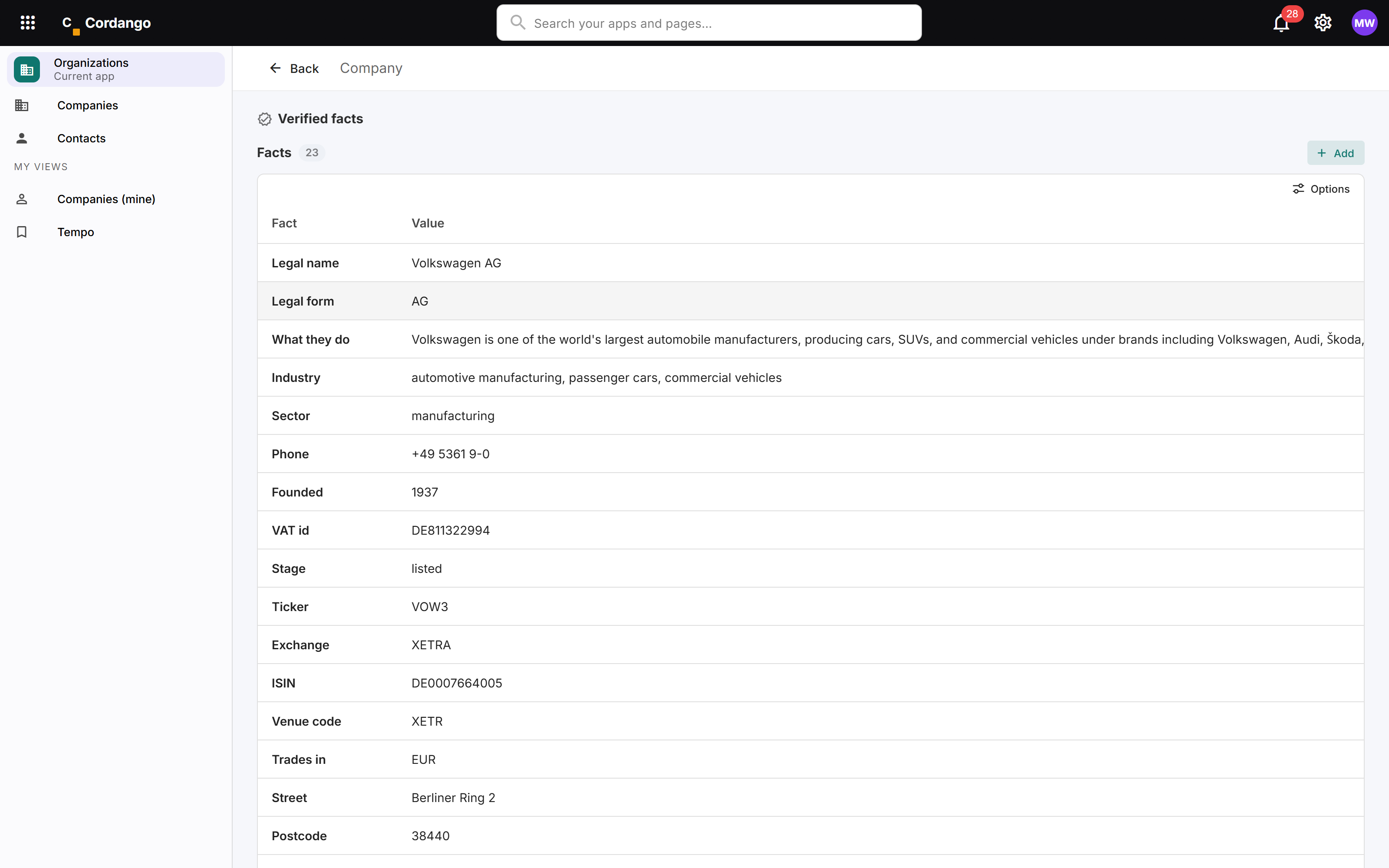
Every value carries how it is known.

— sources & confidence

This is the tab that makes the rest of it usable. The status of the run, the domain it was confirmed against, when it last succeeded, and then every value the run produced as a row you can read.

Each of those rows carries a source, a confidence and a date alongside the value. On this record they read 0.5, and their support says model knowledge rather than a quote, because these are the register and listing fields no website publishes. A page that hid that behind a green tick would be worth less than one that shows it.

  • SOURCE A link where there is one, and plainly nothing where there is not
  • LEVEL Quoted, recalled or unconfirmed, per value
  • KEPT Rejected candidates stay visible with the reason they lost
  • COST Every run listed with its documents, facts and token counts
FIG.08

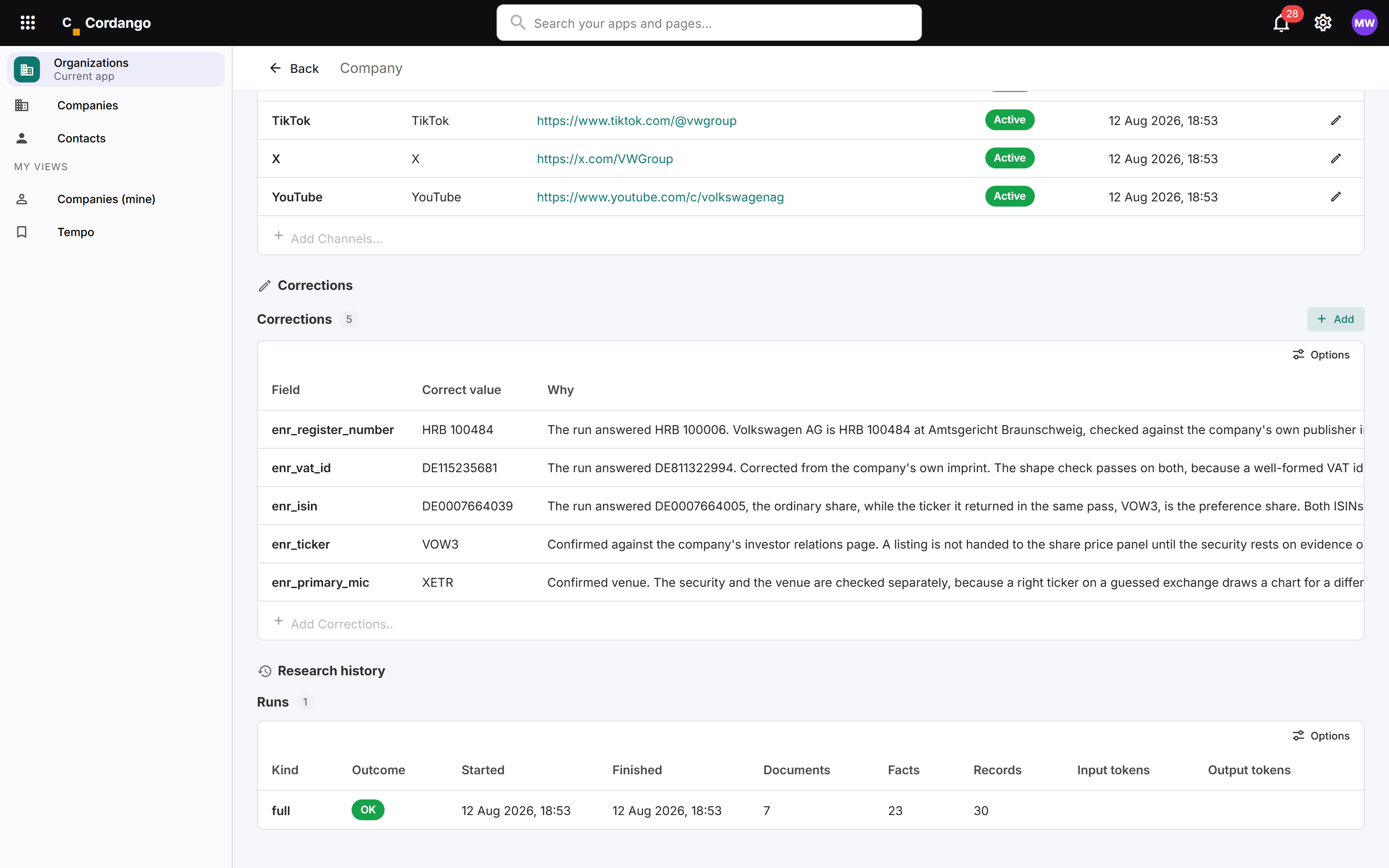
When it is wrong, you say so once.

— and it stays said

These five corrections are real. The run answered HRB 100006 for a company that is HRB 100484, gave a VAT id belonging to nobody in particular, and returned the ISIN of Volkswagen’s ordinary share while naming the preference share’s ticker in the same pass.

Both of those ISINs pass the check digit. That is the whole point of the check digit section above: a valid identifier is not a trusted identifier, and a system that cannot tell you the difference is more dangerous than one that admits it.

A correction is not a note. It is the answer from then on, it survives every future run, and the reason travels with it so the next person does not redo the work.

  • ONCE Correct it once, and no run overwrites it again
  • WHY The reason is stored beside the value, not in somebody’s head
  • GATE A listing is not drawn until its security and venue are confirmed
FIG.09

One company can be three things at once.

— and often is

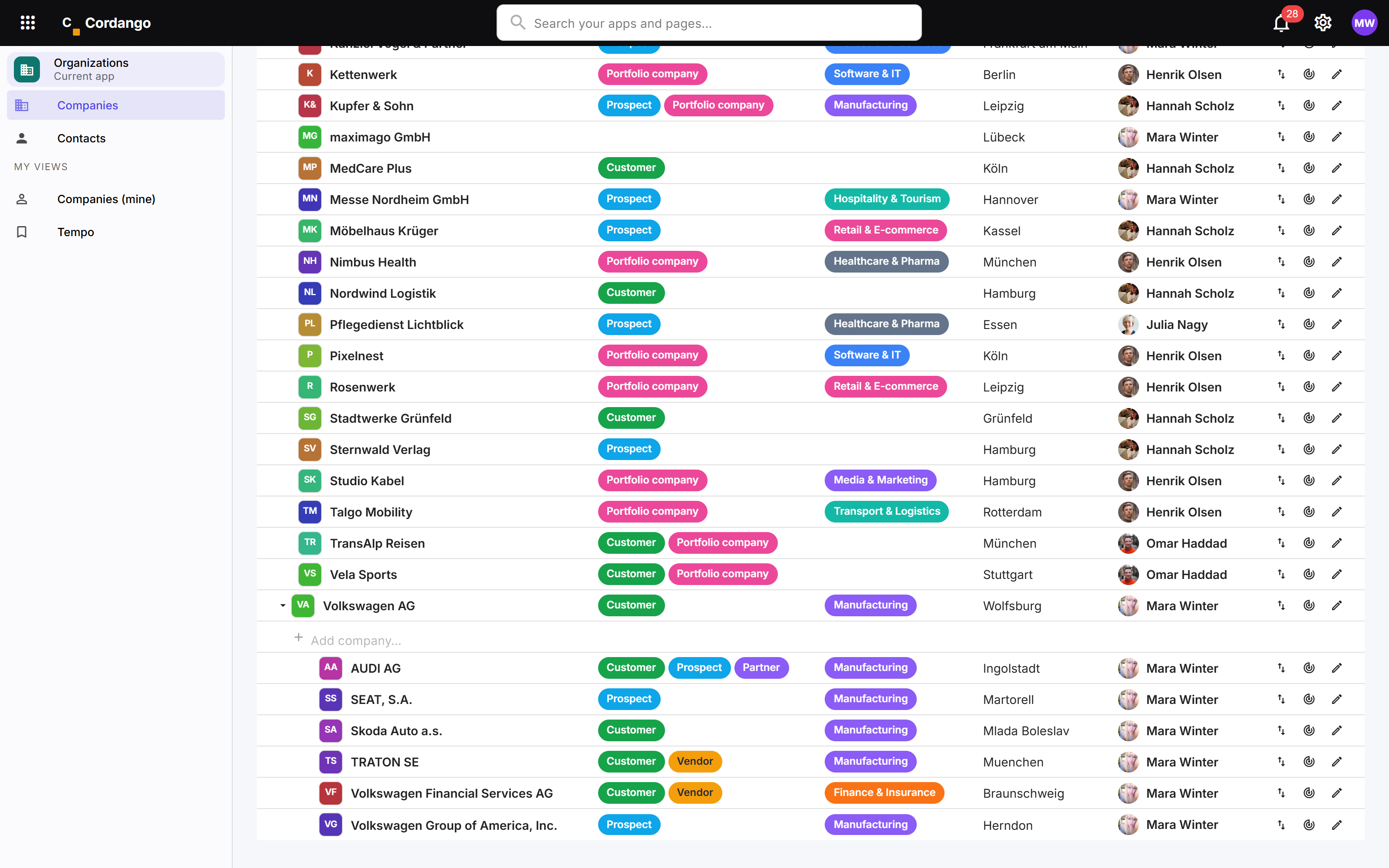
Look at AUDI AG. It is a customer, a prospect and a partner at the same time, and all three are true. A supplier is often also a customer. A prospect is often already a supplier. Those facts do not expire and they do not contradict each other, so the record holds all of them rather than making you pick.

Now look at the indentation. Six companies sit under Volkswagen AG, each its own record because each is invoiced, contracted and researched in its own right. What connects them is the group, not a merge.

  • MANY Six relationship types, held at the same time
  • GROUP Each entity its own record, connected by ownership
  • KEEP Nobody deletes a company, because everything points at it
  • FIND Filter by relationship, industry, country, owner or status
FIG.10

The research reaches every app that points here.

— nothing to wire

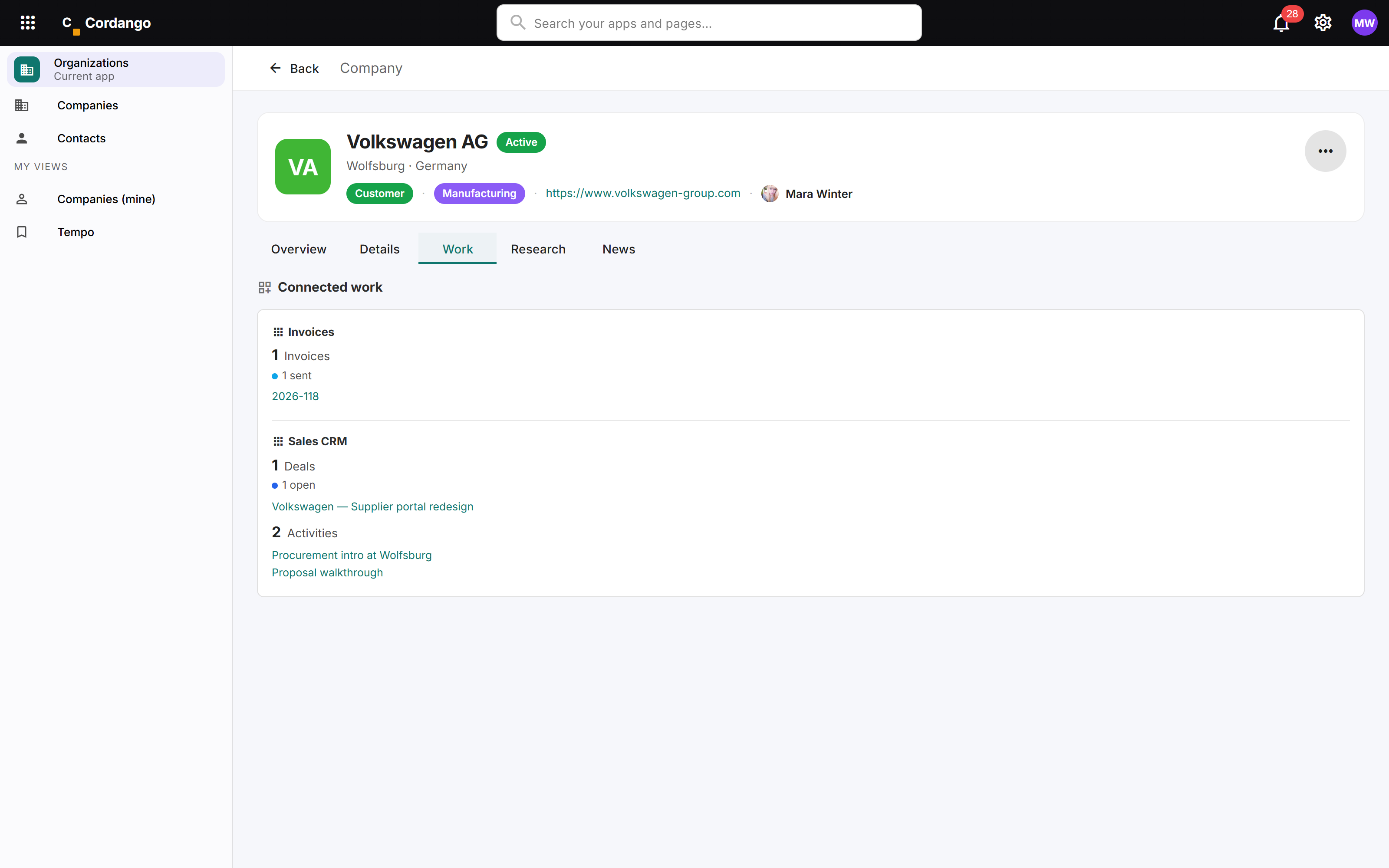
An invoice from invoicing. An open deal and two activities from the CRM. Nobody configured that panel. An app appears on the company page because it references a company, which means an app built this afternoon has a place here this afternoon.

That is the same reason the research is worth doing once. Your CRM does not hold its own idea of who Volkswagen is, so a deal opens onto the registration, the size and the funding without a sync, an import or a second subscription.

Every app in the list is re-checked against your own permissions as the page loads, so opening a company tells you nothing about a CRM you are not allowed to see.

  • AUTO No configuration. Referencing a company is the wiring
  • LIVE Counts and samples read from the real records, now
  • RBAC Each app re-checked against your grants, every time
FIG.11

The record grows as you add capabilities.

Nothing is copied and nothing is synced. Each app adds what it knows to the company that is already there.

FOUNDATION
Company
Legal identityAddressesRelationshipsGroupContactsOwnerResearched profile
+ CRMsales
OpportunitiesPipeline stageLast contactNext step
+ Projectsdelivery
Active projectsDelivery leadMilestonesHours booked
+ Invoicesfinance
InvoicesPaid and openBalancePayment history
+ Supportservice
TicketsOpen issuesResponse times
+ Contractslegal
AgreementsRenewal datesNotice periods
Ask what is going on with a customer and you get one answer, not five tabs.
FIG.12

The record is fixed. What you build around it is yours.

One agreed spelling of every company you deal with is the entire point, so the shared record is deliberately not something each workspace redesigns. Everything particular to your business goes in an app of your own that points at the same company.

YOUR APP

Your fields, on your own app

Our own investment app carries twenty-eight fields about a company: stake, entry date, valuation, thesis, exit proceeds. None of them are on the shared record, and all of them hang off it.

NO WIRING

It shows up by itself

An app that references a company gets a place on the company page the day it is built. There is no core definition to edit and nothing to remember.

YOUR VIEW

Your own way of looking at it

Build your own pages and saved filters over Organizations, or describe the view you want in a sentence. Shared as a link, it carries the layout and none of the data.

Your own fields on the shared record itself are in build. See the roadmap →

MORE

Further reading

NEXT

Bring one customer that lives in three systems.

Bring a company you deal with and we will put it in, research it while you watch, and show you what every app in the workspace already knows about it.

About 30 minutes, on a real company platform